
overidon.com Central Database for Overidon Omnimedia

April 15, 2013

Take a chill ride within the IMMOOR Hatchback

Filed under: Music-Downloads — Tyler @ 10:02 pm
Click the image to listen/download the music for free

Click the image to listen/download “Hatchback” for free

Remember the 1980’s music that had excellent orchestration and outstanding vocals? That’s what “Hatchback” reminds me of when I listen to IMMOOR’s latest single.

Yet although this tune has a retro-feel, the effects and precision as well as production value makes you wanna pump the volume to room-bending levels.

The song has full and space-saving interlude with words like, “away” which float around while slipping a bassline into the mix without taking prisoners. Did I mention you can download this song for free on Bandcamp?

If IMMOOR’s new album is anything like Hatchback, then we’re seeing a different direction in IMMOOR’s music from “She Moves.” The dance vibe has been superseded by an electronic melancholy that has been perked up by a positive experience. Come to think of it, this has a different feel from the tracks from the “Concrete Boots EP” as well. That one was a little more ‘heady’ and internal. This song definitely feels like a song that would be perfect to share with friends and buddies.

Just in case you want to preview the song “Hatchback” before your preview it on Bandcamp…I embedded it below.

-Tyler


April 4, 2013

Awesome tool for checking CPU and RAM and grafix card

Filed under: Reviews — Tyler @ 10:19 pm
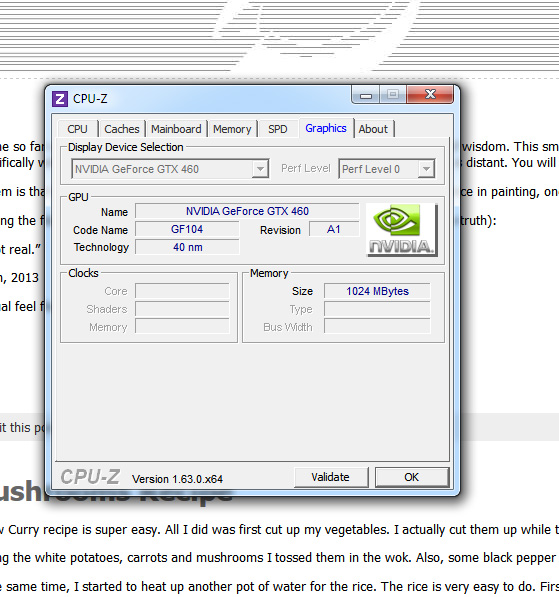
CPU-Z scan of my graphics card

CPU-Z scan of my graphics card

Have you ever wondered what kind of motherboard or ram your custom computer was using? I had the same question because my computer was custom-built by a great team but it was made so long ago I forgot if my computer could be upgraded to a larger amount of RAM.

After some searching on the internet, I found a program called, “CPU-Z” which scanned my hardware and told me what kind of RAM I had, the type of motherboard and other interesting facts.

It said that I was using a Phenom AMD processor and a main board with a very specific model number. I was able to cross-reference that model number with AMD’s website, and I found out that my motherboard was Capped at 8 gigs of RAM. This meant I was already at my maximum amount of RAM.

So by using CPU-Z, I didn’t have to open up my computer to see if I had any extra slots for RAM. That saved me some time. Also, by using CPU-Z, I didn’t need to purchase any RAM just to find out that I’d need to return the items. Overall, I was able to answer my own question without using more than 20 minutes of time…and that time included the time it took me to research the CPU-Z program itself.

In closing, I’d definitely say that CPU-Z is an awesome tool for checking RAM and graphics card data and CPU information as well as motherboard info.

You can check out their site by clicking HERE.

-Tyler

PS: I downloaded the version of the program that was a standalone x86 program executable. I didn’t do the installer version. As usual read our disclaimer and TOS before making any hasty decisions.


March 15, 2013

The Ultimate Truth

Filed under: Philosophy — Tyler @ 11:27 pm
the ultimate truth

The Ultimate Truth

We’ve come so far and we’ve done so much…that now it’s time to share an actual piece of wisdom. This small piece of information is not an answer to the meaning of life. That was actually covered in another article. This article deals specifically with the ultimate truth. With this truth, everything is achievable. Nothing is distant. You will know it when it hits you.

The problem is that the Ultimate Truth can’t be disseminated directly. Like the negative space in painting, one must describe what the ultimate truth is not. So here goes…I’m going to do the best I can with this.

After reading the following statement, know that the following statement is false (or a non-truth):

“Love is not real.”

March 15th, 2013

PS: As usual feel free to copy/paste or share this small article in e-mail or other formats.

Yours,

-Tyler


March 5, 2013

Yellow Curry with White Mushrooms Recipe

Filed under: Cooking — Tyler @ 5:45 pm
Yellow Curry: Mushrooms and Carrots and Also White Potatoes

Yellow Curry: Mushrooms and Carrots and Also White Potatoes

This Yellow Curry recipe is super easy. All I did was first cut up my vegetables. I actually cut them up while the wok water was heating up. This saves time.

After cutting the white potatoes, carrots and mushrooms I tossed them in the wok. Also, some black pepper and salt was added to the mix.

Around the same time, I started to heat up another pot of water for the rice. The rice is very easy to do. First, boil the rice till you start to see that bubble stuff appear. The biggest mistake is using too much water, overcooking the rice and then discarding water. Never discard water. You loose nutrients that way.

The trick is to use only a little bit of water for the rice. And after the rice begins to make those filmy bubbles…turn off the rice heat and then cover the rice while it is still on the stove. The residual heat will create a toroidal temporary convection which will recycle the heat in the pot. Since it’s covered, all the water will be absorbed into the rice. This makes the rice taste great and you don’t have to multi-task it at all.

Once the vegetables in the wok are boiling and the water seems to be bubbling away, add the curry powder, more pepper and a little salt. Once the vegetable curry becomes slightly saucy instead of watery…you’re done!

I actually added a little, “Beef Bullion” to the curry to add some meat flavor. But that is completely optional. If you want a vegetarian and/or vegan meal skip that step. But since I’m an omnivore I added it for a little pizazz!!

Here’s a video which shows you the end product and a little about the process:

-Tyler

« Newer PostsOlder Posts »

Powered by WordPress